
If you talk to almost any construction team, you’ll hear the same frustrations.
Things fall through the cracks. Information is scattered across spreadsheets, emails and paper forms. Crews in the field and teams in the office aren’t always working from the same information.
Instead of moving projects forward, people are stuck chasing updates, fixing mistakes and re-entering the same data over and over again.
It’s not that people don’t know what they’re doing, it’s that the systems around them don’t support how construction actually works.
Take Mainroad Group for example, a major road construction and maintenance provider in Western Canada, as their business grew so did the challenges they faced.
They were dealing with:
- No real-time visibility across teams and departments
- Time tracking that slowed down field crews
- Disconnected data that delayed decisions
- An ERP system that couldn’t keep up with how they actually worked
They needed a better way to manage their workflows without adding more complexity.
By partnering with Ontraccr, Mainroad moved from manual, disconnected processes to a streamlined digital system, cutting data entry time by 85% (from a full week down to one day) and reducing errors by 30%.
That’s exactly why we built a set of ready-to-use workflows in Ontraccr, not as rigid templates, but as practical starting points based on real operational pain points. Teams can take them and adapt them to how they already run.
Here’s a look at five workflows designed to solve the kinds of problems the construction and field operation sectors deal with every day.
How to Manage Service Jobs and Work Orders in Construction (Service Job Management Workflow)
Service work sounds simple, until you’re actually managing it.
Requests come in through emails, phone calls or texts. Dispatching is reactive. Field teams don’t always have the full scope. And by the time the job is done, someone still has to chase down details just to invoice it properly.
It adds up quickly. Jobs get delayed, details get missed and billing takes longer than it should.
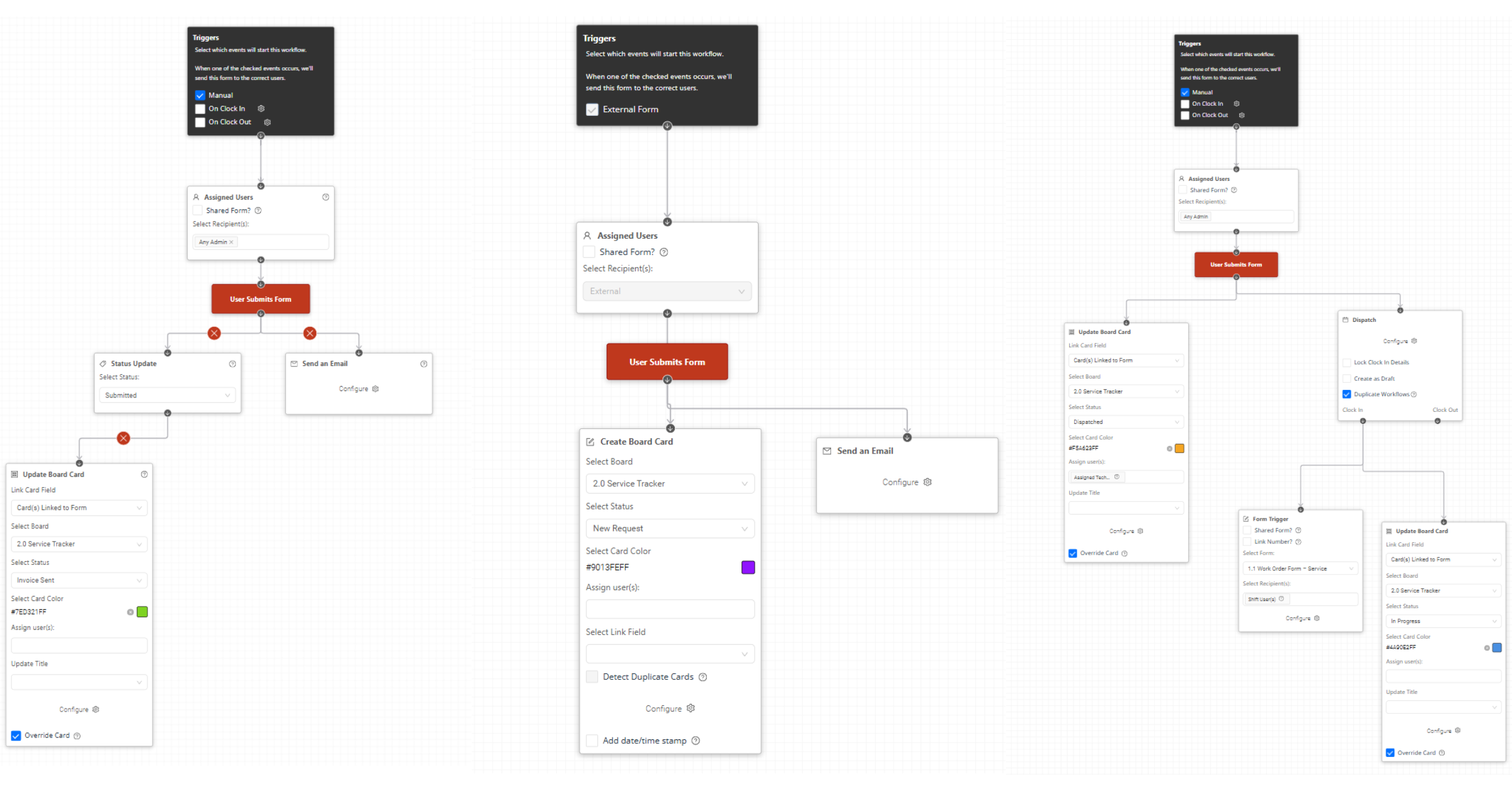
With our Service Job Management workflow, once a service request is submitted, the workflow takes over immediately. There’s no handoff, no chasing information and no need for someone to manually move things along.
It starts with the trigger. Depending on how your team is set up, the form can be filled out manually, triggered when someone clocks in or out or submitted externally by a customer. As soon as that happens, the system assigns the form to the right people and waits for it to be completed.
When the form is submitted, that’s where everything kicks into motion.
First, the system creates or updates a job in your tracking board. Think of this board like a live job tracker (similar to a task board) where every service request becomes a trackable job. If it’s a new request, a new job is created automatically and placed into a starting stage (like “New Request”). If it’s an existing job, it gets updated instead, moving it forward, assigning people and clearly showing its current status.
At the same time, notifications are sent automatically. The right people are alerted right away, so no request gets missed and no one has to wonder what’s been submitted.
From there, the workflow moves into dispatching. This is where the job gets connected to actual field work, assigned to technicians and tied into their schedule. Instead of someone manually calling or texting to figure out who’s available, the system handles the handoff in a structured way.
As the job progresses, the workflow can also send follow-up forms automatically. For example, once a job is dispatched, a work order or service form can be sent to the field team. This gives them a clear place to see the job details and log what they’re doing while they’re on-site.
As updates come in from the field, the system continues to sync everything back to the job tracker, updating statuses and capturing details in real time. Nothing has to be remembered or rewritten later.
Take Quality Millwright & Machine Services as an example, after implementing Ontraccr, they achieved a 40% boost in task processing time. Explore their full case study to see how Ontraccr made an impact - https://www.ontraccr.com/qualitymillwright
Why This Matters
Instead of juggling requests, updates and paperwork across emails, calls and texts, everything flows through one connected system:
- Requests instantly become trackable jobs
- Jobs move forward automatically as work happens
- Field teams capture details while they’re on-site
- Office teams don’t have to chase information afterward
By the time the job is complete, the full picture is already there - organized, accurate and ready for invoicing or review.
Managing New Hire Onboarding for Construction Teams (Employee Onboarding Workflow)
Onboarding is one of those things that every company has a process for… but no two hires go through it the same way.
One person is missing documents. Another hasn’t completed training. Someone else never got assigned what they needed. And HR is stuck chasing people just to make sure everything is done.
The Employee Onboarding workflow creates a clear path from day one.
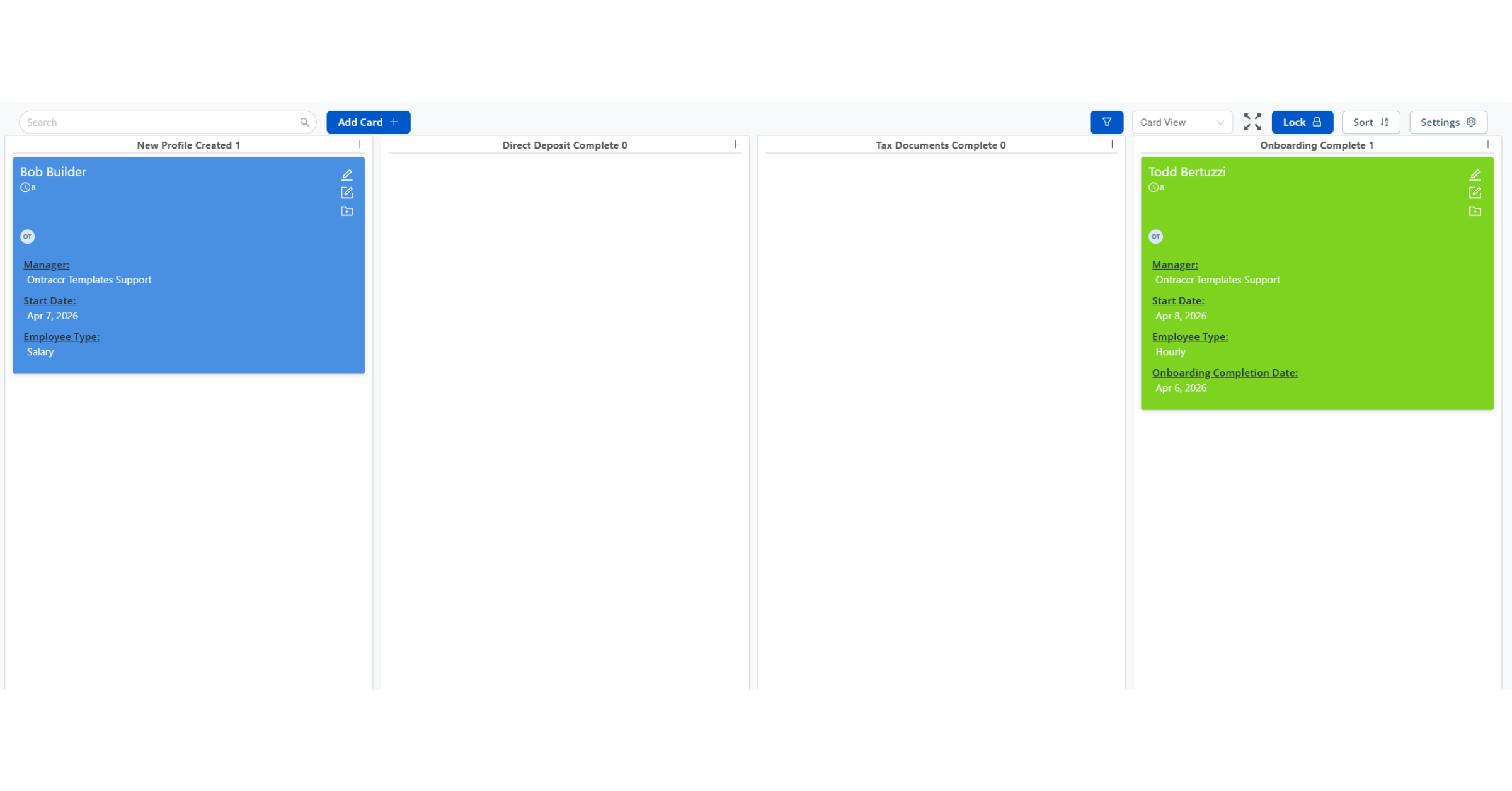
Each new hire appears as a card and progresses through a clearly defined set of stages, from initial profile setup and payroll details to submitting required documents. Along the way, construction-specific steps like safety certification verification, PPE assignment and site access setup are built directly into the process, ensuring workers are fully compliant and ready before stepping on-site. The journey concludes with site-specific safety forms completed and onboarding fully finalized.Instead of relying on checklists, emails or memory, the entire process is laid out in one place.
At the start, a new hire shows up in the first stage, indicating their profile has been created but onboarding is still in progress. From there, as they complete each required step, like submitting direct deposit information or tax documents, their card automatically moves forward.
This movement isn’t manual. It’s driven by the workflow behind the scenes. When a form is completed or a requirement is met, the system updates the employee’s status and progresses them to the next stage. That means no one has to follow up just to confirm if something is done, the board reflects it in real time.
Managers and HR can quickly see where every employee stands:
- Who just started and still has steps to complete
- Who is partway through and may be missing something
- Who is fully onboarded and ready to go
Instead of digging through emails or asking for updates, everything is visible at a glance.
Why This Matters
Onboarding often breaks down not because the process is unclear, but because there’s no consistent way to track it.
This changes that.
Each step is structured, each requirement is accounted for and progress happens automatically as work gets completed. The result is a smoother onboarding experience for new hires, less follow-up for HR and a clear, reliable process that doesn’t depend on manual coordination.
By the time someone reaches the final stage, you know with confidence that everything has been completed properly.
Why RFIs Keep Slowing Your Projects Down (RFI Tracking Workflow)
RFIs rarely feel urgent in the moment, but when they’re not handled properly, they quietly slow everything down.
Someone submits a request. It sits waiting for approval. It gets lost in an inbox. Or it’s answered, but not tracked properly. Weeks later, it turns into confusion, rework or delays on site.
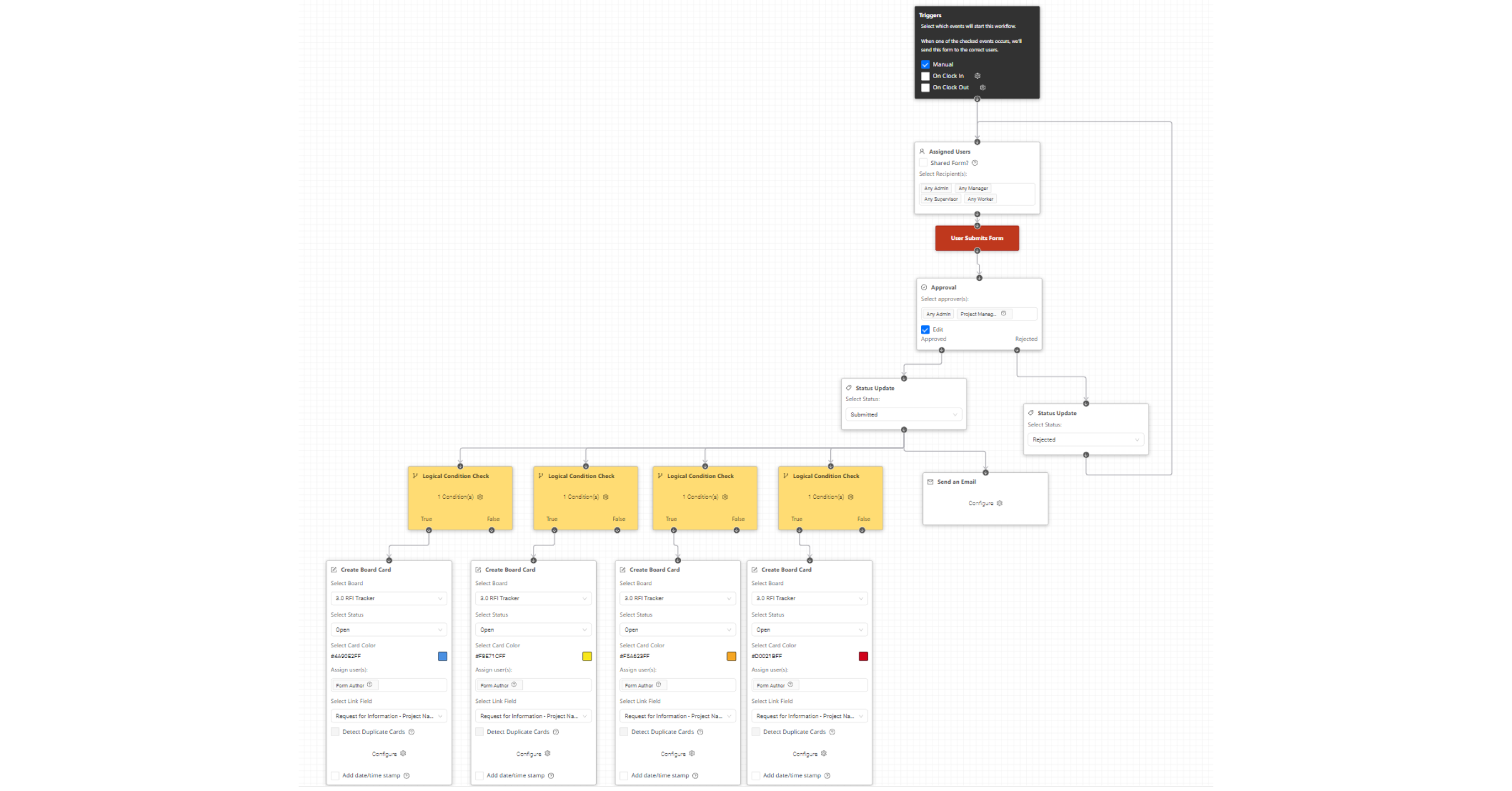
Once an RFI is submitted on our platform, it doesn’t sit in someone’s inbox or rely on someone remembering to follow up. The workflow takes over immediately and moves it forward in a structured way.
It starts with a simple submission. A team member fills out the RFI form and as soon as it’s submitted, it’s automatically routed to the right people for review. There’s no need to forward emails or manually notify anyone, the system handles that step.
From there, the request goes through an approval stage. A manager or project lead reviews the RFI and decides whether it’s ready to move forward or needs to be rejected. This creates a clear checkpoint, so nothing gets acted on without proper review.
If the RFI is rejected, it’s marked as such and stops there. No confusion, no duplicate work, no uncertainty about its status.
If it’s approved, the workflow continues automatically.
At that point, the system begins to categorize the request based on its details. Instead of someone manually deciding where it belongs, built-in logic checks the information submitted and determines how it should be handled.
Based on that, the system creates a task in your tracking board. Think of this board like a centralized request tracker (similar to a task board) where every RFI becomes a trackable item. Each request is placed into the right category, assigned to the right people and clearly marked so it can be followed from start to finish.
At the same time, notifications are sent automatically, so everyone involved knows what’s been approved and what needs attention next.
From there, the RFI is no longer just a message, it’s a structured, trackable item that moves through your process with full visibility.
Why This Matters
RFIs don’t usually cause problems because they’re complicated. They cause problems because they’re inconsistent.
Some get answered quickly. Others sit. Some are tracked. Others disappear into conversations or inboxes.
This changes that.
Every request follows the same path:
- It’s submitted in a consistent format
- It’s reviewed and approved before action
- It’s automatically categorized and tracked
- It’s visible to everyone involved
The result is fewer missed requests, clearer accountability and a process that keeps projects moving instead of slowing them down.
How to Track Bids and Convert Them into Projects (Bid and Project Tracking Workflow)
Winning work is one thing. Keeping momentum after you win it is another.
Too often, bid tracking lives in one place, proposals are built somewhere else and when a job is awarded, the handoff into execution is rushed or incomplete. Information gets re-entered, details get missed and teams start projects already playing catch-up.
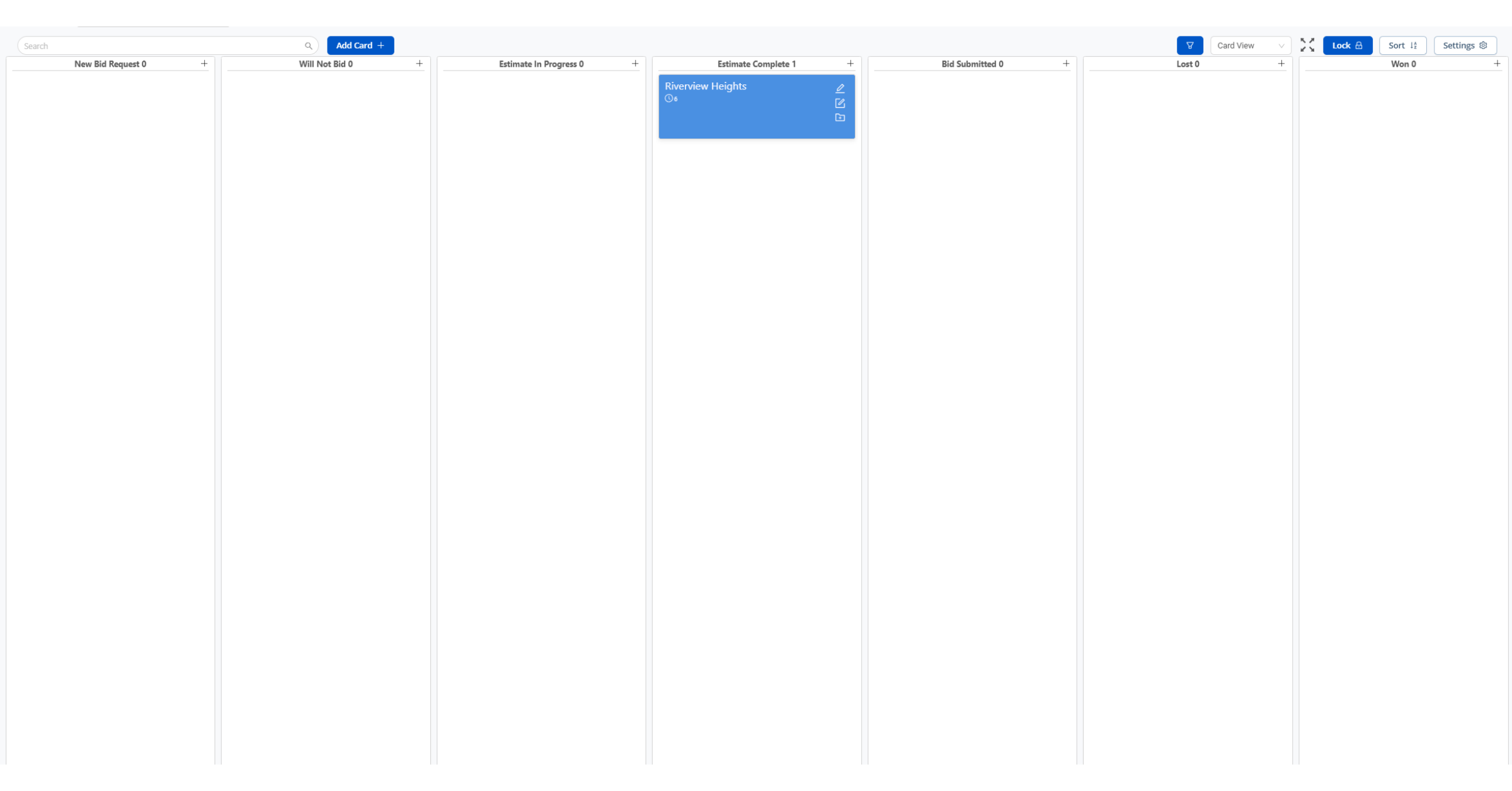
Ontraccrs bid tracking board shows exactly where every opportunity stands, from new requests to submitted bids to final outcomes.
Each project appears as a card and moves through stages like estimating, submission and ultimately won or lost. It gives your team a clear, real-time view of what’s in progress, what’s ready to go out and what’s already been decided.
But what makes this work isn’t just the board, it’s what’s happening behind the scenes.
When a bid is ready, the team doesn’t have to manually update the board or notify anyone. Instead, they complete a simple submission form. That single action triggers the workflow.
As soon as the form is submitted, the system automatically finds the correct project and updates it in the pipeline, moving it into the “Bid Submitted” stage, updating its status and assigning the right people. At the same time, notifications are sent out, so everyone knows the bid has gone out without needing a separate message or follow-up.
In other words, the board updates itself based on real activity.
There’s no dragging cards, no duplicate data entry and no risk of something being marked incorrectly or forgotten. The workflow connects the action (submitting a bid) directly to the outcome (updating the pipeline).
Why This Matters
The gap between estimating and execution is where a lot of time gets lost.
Without a connected process, teams end up:
- Updating tracking tools manually
- Re-entering the same information in multiple places
- Following up just to confirm what’s been done
This changes that.
Every bid follows a consistent path:
- It’s tracked from the moment it comes in
- It progresses based on real actions, not manual updates
- It stays accurate without extra effort
And when a job is won, that same structure carries forward, so instead of restarting the process, you’re building directly from what’s already been done.
The result is a smoother handoff, better visibility into your pipeline and a faster transition from winning work to starting it.
How to Track Labor, Equipment and Materials in Construction (Daily Timesheets & LEM Reports)
Time tracking starts in the field, not at the end of the day.
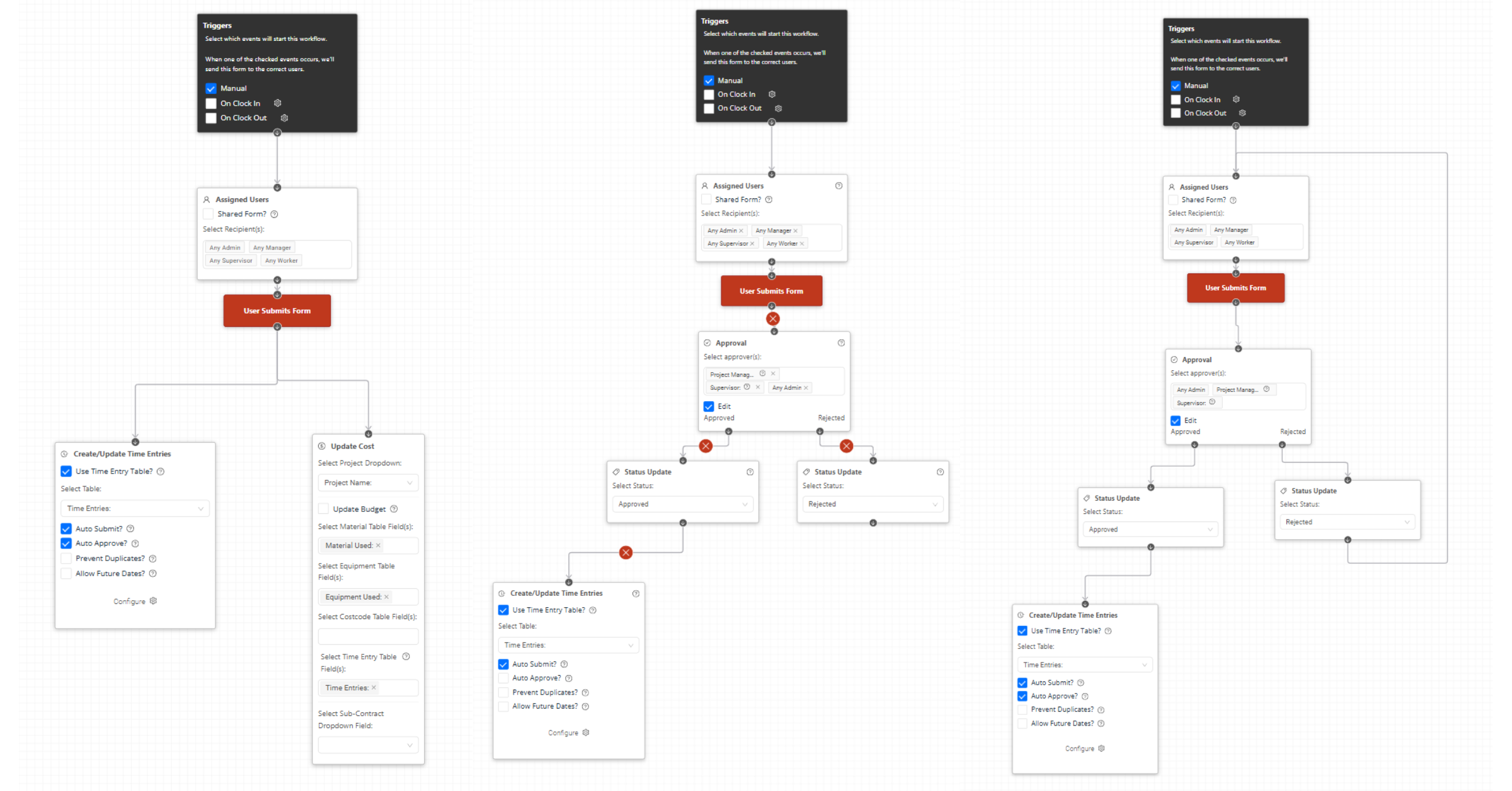
Instead of writing things down to deal with later, crews submit their time, equipment usage and materials through a simple form while the work is happening. That one submission is all it takes to kick off the process.
From there, the workflow takes over.
In some cases, the information goes straight through - time entries are automatically created and logged and the system immediately connects that data to the project. Labour hours, equipment usage and materials are all captured and tied back to the job without anyone needing to re-enter it somewhere else.
At the same time, the system can update project costs automatically using that same data. Instead of tracking labour, equipment and materials separately, everything flows into one place in real time.
In other cases, where more control is needed, the workflow introduces an approval step. A supervisor or manager reviews the submission before it’s finalized. If it’s approved, the time is logged and costs are updated. If it’s rejected, it’s clearly marked and doesn’t move forward.
Either way, the process is consistent.
What used to require multiple steps (recording time, submitting it, reviewing it, entering it into another system and updating costs) is now handled through a single action. The system takes care of the rest.
Why This Matters
The biggest issue with tracking labour, equipment and materials isn’t capturing the data, it’s capturing it accurately and consistently.
Without a connected process, teams end up:
- Writing things down and entering them later
- Chasing approvals after the fact
- Updating costs separately from the work itself
This creates gaps, delays and mistakes that ripple into reporting and billing.
This changes that.
Every entry follows a clear path:
- It’s captured once, at the source
- It’s validated if needed through approvals
- It’s automatically recorded and connected to the project
- It updates costs without extra steps
The result is cleaner data, less admin work and a real-time view of what’s actually happening across your projects, without relying on memory or manual follow-up.
A Better Way to Manage Construction Workflows
At the end of the day, these challenges aren’t new. Project managers are stuck chasing updates instead of managing progress. Field crews are slowed down by paperwork instead of focusing on the work. Information is scattered, processes are inconsistent and teams are left reacting instead of staying ahead.
What we’ve shown here isn’t just a set of features, it’s a different way of working. By connecting your workflows, automating the handoffs and capturing information at the source, you eliminate the gaps that cause delays, errors and rework. The result is less admin, better visibility and processes that actually support how construction teams operate in the real world.
Take the Next Step Toward Streamlined Construction Operations
If you’re new to Ontraccr, book a demo to see how these workflows can fit into your operations and start simplifying the way your team works. If you’re already a client, reach out to your account manager or customer success rep to explore the new workflow templates and get them set up in your environment.