

Time tracking starts in the field, not at the end of the day.
On a construction site, labor hours, equipment usage and material quantities change constantly. Crews move between tasks, machines are used across different jobs and materials are delivered, installed or consumed throughout the day.
But for many construction companies, that information is still captured after the work happens.
Crews write details down on paper, send updates through text, fill out spreadsheets or rely on someone in the office to enter everything later. By the time the information reaches project managers, payroll or accounting, it may already be incomplete, delayed or inaccurate.
That creates problems across your business.
Late timesheets slow down approvals. Missing equipment usage affects job costing. Inconsistent material tracking makes reporting harder. And when the same information has to be entered into multiple systems, there is more room for mistakes.
A better Daily Timesheets and LEM Reports workflow helps your construction teams capture labor, equipment and materials directly from the field, connect that information to the right project and update records without relying on duplicate entry.
What Are LEM Reports in Construction?
LEM stands for Labor, Equipment and Materials.
A LEM report gives you a clear record of the resources used on a project. It usually includes:
- Labor hours worked by employees or crews
- Equipment used on site and for how long
- Materials consumed, installed, delivered or charged to the job
- Project details, cost codes, notes and approvals
When LEM reports are accurate, they help teams understand what happened on site and how that activity affects project costs.
When they are inaccurate or delayed, it becomes harder to manage job costing, billing, payroll, productivity and project performance.
That is why the process matters.
The issue is not just collecting the information. The issue is collecting it consistently, approving it when needed and making sure it flows into the right project records.
The Problem with Manual Tracking
Manual tracking usually creates more work than teams realize.
A typical process might look like this:
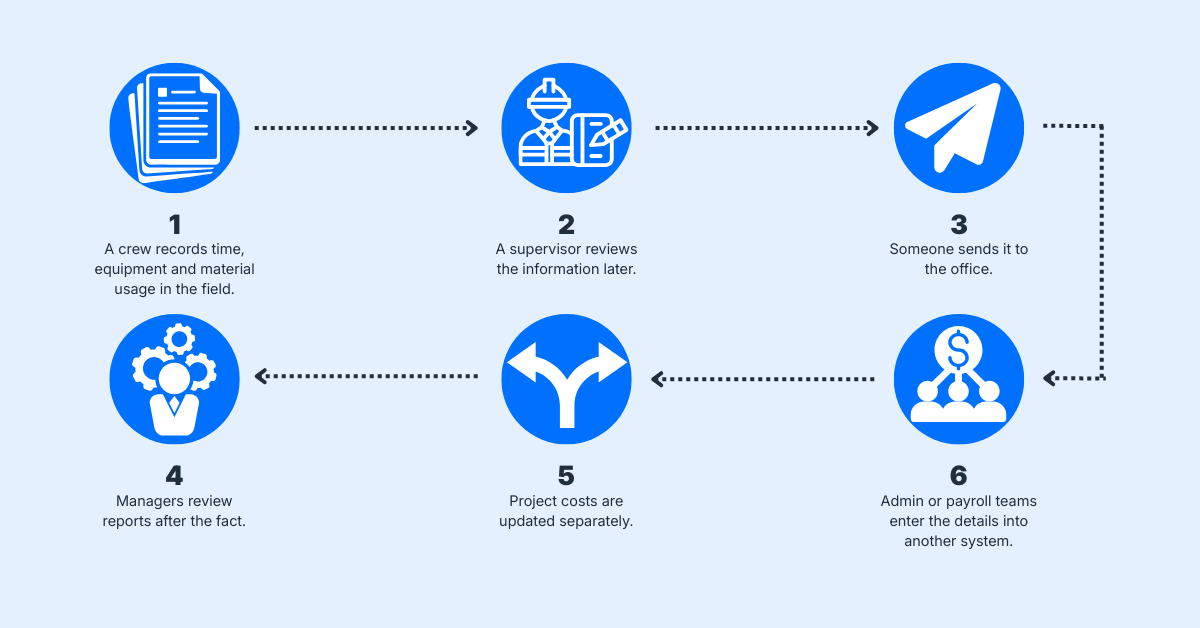
Each step adds another handoff.
That means more delays, more follow-up and more chances for errors.
Without a connected workflow, teams often deal with:
- Late or missing timesheets
- Duplicate data entry
- Approval bottlenecks
- Inaccurate labor or equipment records
- Material usage that is hard to verify
- Delayed project cost updates
- Inconsistent reporting between crews or jobs
Over time, these small issues can turn into bigger problems.
Project managers may not have a clear view of current costs. Payroll teams may need to correct time entries. Billing may be delayed because backup documentation is missing. Leadership may struggle to compare performance across projects.
The root problem is usually the same, field data is not being captured and connected quickly enough.
A Better Way to Track Daily Timesheets and LEM Reports
A connected workflow starts where the work happens, in the field.
Instead of writing information down and dealing with it later, crews submit their time, equipment usage and materials through a simple digital form.
That one submission starts the workflow.
From there, the process can be automated based on how the company wants to handle approvals, time entries and project cost updates.
In some cases, the submission can move straight through. Labor hours are logged, equipment usage is recorded, materials are captured and the information is connected to the project automatically.
In other cases, the workflow can include an approval step.
A supervisor or manager reviews the submission before it is finalized. If it is approved, the time is logged and costs are updated. If it is rejected, the submission is marked and sent back for correction.
Either way, the process becomes consistent.
The field submits the information once. The system routes it, records it and connects it to the job.
Want to view our Daily Timesheets and LEM Workflow checklist?
Get the free PDF guide sent to your inbox.

Example: How the Workflow Works
Here is a simple example of how a Daily Timesheets and LEM Reports workflow can work.
1. Field Submission
A foreman or crew member submits a daily report from the field.
The form may include:
- Project name
- Date
- Crew members
- Labor hours
- Overtime
- Cost codes
- Equipment used
- Equipment hours
- Materials used
- Quantities
- Notes or photos
This helps standardize what gets captured across different crews and projects.
2. Automatic Routing
Once submitted, the workflow determines what should happen next.
A standard time entry may be logged automatically. An overtime entry may require supervisor approval. A high-value material entry may need project manager review.
This gives companies control without slowing down every submission.
3. Approval or Rejection
If approval is required, the right person receives the submission.
They can review the details, approve the entry or reject it with a reason. Rejected entries do not move forward until they are corrected.
This helps prevent inaccurate data from affecting payroll, billing or job costs.
4. Records Are Updated
Once approved, the information is automatically connected to the project.
Labor is logged. Equipment usage is recorded. Materials are captured. Project costs can be updated using the same data.
No one needs to re-enter the same information somewhere else.
Manual Process vs. Connected Workflow
.png?width=1200&height=628&name=Table-Manual-VS-Connected%20(1).png)
The main benefit is not just speed.
It is reliability.
When every submission follows the same process, teams spend less time chasing information and more time using that information to manage the job.
Why This Matters for Construction Teams
Labor, equipment and materials are some of the biggest cost drivers on a construction project.
If they are not tracked properly, it becomes difficult to understand where the project stands.
A connected Daily Timesheets and LEM Reports workflow can help teams:
- Reduce duplicate data entry
- Improve timesheet accuracy
- Speed up approvals
- Standardize field reporting
- Connect field activity to project costs
- Improve visibility for project managers
- Reduce admin work for office teams
- Create cleaner records for billing and reporting
This is especially valuable for companies managing multiple crews, projects or locations.
The more moving parts there are, the more important it becomes to have one consistent process for capturing daily activity.
Check out Mainroad Group's Case Study to see how they transformed their processes to become a fully connected workflow.
Who This Workflow Is For
A Daily Timesheets and LEM Reports workflow is useful for construction companies that need better visibility into field activity and project costs.
It can support:
- General contractors managing multiple job sites
- Civil and infrastructure contractors tracking crews, equipment and materials
- Electrical, mechanical and specialty contractors managing labor-heavy work
- Project managers who need more accurate job cost data
- Payroll and accounting teams that rely on approved time records
- Operations teams trying to reduce manual follow-up
Every company may track LEM slightly differently, but the goal is usually the same, capture accurate information once and use it across the business.
Customizing the Workflow
Not every construction company needs the same approval process.
Some companies may want daily timesheets to flow directly into project records. Others may need multiple levels of approval before time, equipment or materials are finalized.
A workflow can be customized around:
- Cost codes
- Project types
- Crew structures
- Equipment categories
- Labor classifications
- Overtime rules
- Material tracking requirements
- Supervisor approvals
- Payroll or billing processes
- Reporting needs
For example, regular labor hours could be approved automatically, while overtime, equipment usage or high-cost materials could require review.
This allows companies to move faster without giving up control.
How to Get Started
The best place to start is by reviewing the current process.
Ask:
.png?width=1200&height=628&name=Getting-Started-Workflow%20(1).png)
Once those gaps are clear, the workflow can be built around the areas causing the most delays.
Many companies start with daily timesheets first, then add equipment and material tracking once the process is working smoothly.
The goal is not to make the workflow complicated. The goal is to make it easier for field teams to submit accurate information and easier for office teams to trust the data.

Tracking labor, equipment and materials should not depend on memory, paperwork or manual follow-up.
When field teams submit information once and that data flows through the right approvals, records and project cost updates, the entire process becomes more reliable.
Crews spend less time on paperwork. Supervisors get a clearer approval process. Office teams reduce duplicate entry. Project managers get better visibility into what is happening on the job.
A connected Daily Timesheets and LEM Reports workflow helps construction companies move from delayed, manual tracking to a more accurate and consistent way of managing field activity.
Want to see what this looks like in action?
Explore Ontraccr’s Daily Timesheet & LEM Report workflow to see how labor, equipment and material tracking can move from field submission to automated approvals, project updates and reporting.
View the workflow here: https://www.ontraccr.com/workflow/daily-timesheet-lem-report