

If your construction team is constantly chasing clarification through email threads, spreadsheets, text messages and meeting notes, the problem might not be communication itself. The problem might be that your Request for Information (RFI) process is too disconnected.
RFIs are meant to keep projects moving by turning questions into documented answers. But when requests are submitted in different formats, reviewed by different people and tracked in different places, it becomes hard to know what has been asked, who needs to respond, which answers are still outstanding and whether the field is working from the most current information.
For many construction teams, this pain shows up as delayed responses, missed follow-ups, duplicate data entry, unclear ownership and project information that is difficult to find when it matters most. You may not be searching for “RFI workflow software” yet. You might just be trying to solve a more familiar problem - too many open questions, too little visibility and too much time spent manually tracking project communication.
That is where a structured RFI workflow can help. By standardizing how RFIs are submitted, reviewed, tracked and stored, construction teams can create a clearer path from the original question to the final answer. Instead of relying on someone to remember every follow-up, update every log and forward every response, the process becomes easier to manage from start to finish.
Why RFIs Become Hard to Manage
Most RFI problems do not happen because teams are disorganized. They happen because the process depends too heavily on manual coordination.
A typical RFI may start in the field. Someone notices an issue, sends a message, attaches a photo or asks the project manager for clarification. From there, the project manager may need to interpret the request, enter it into a log, forward it to the right reviewer, wait for a response, send reminders, update the log again and then distribute the answer back to the team.
Every handoff creates a chance for information to slow down or get missed.
The most common problem is that the RFI itself becomes separated from the work it affects. The original question may be in one place, the supporting photos somewhere else, the approval in another thread and the final response in a folder that not everyone can access. Even when the answer exists, people may not know where to look.
That is where delays begin. Field teams wait for clarification. Project managers spend time chasing updates. Office teams manually maintain logs. Leadership has limited visibility into how many RFIs are open, which ones are overdue and where project communication is getting stuck.
For a small number of RFIs, this may only create inconvenience. Across multiple projects, it creates operational drag.
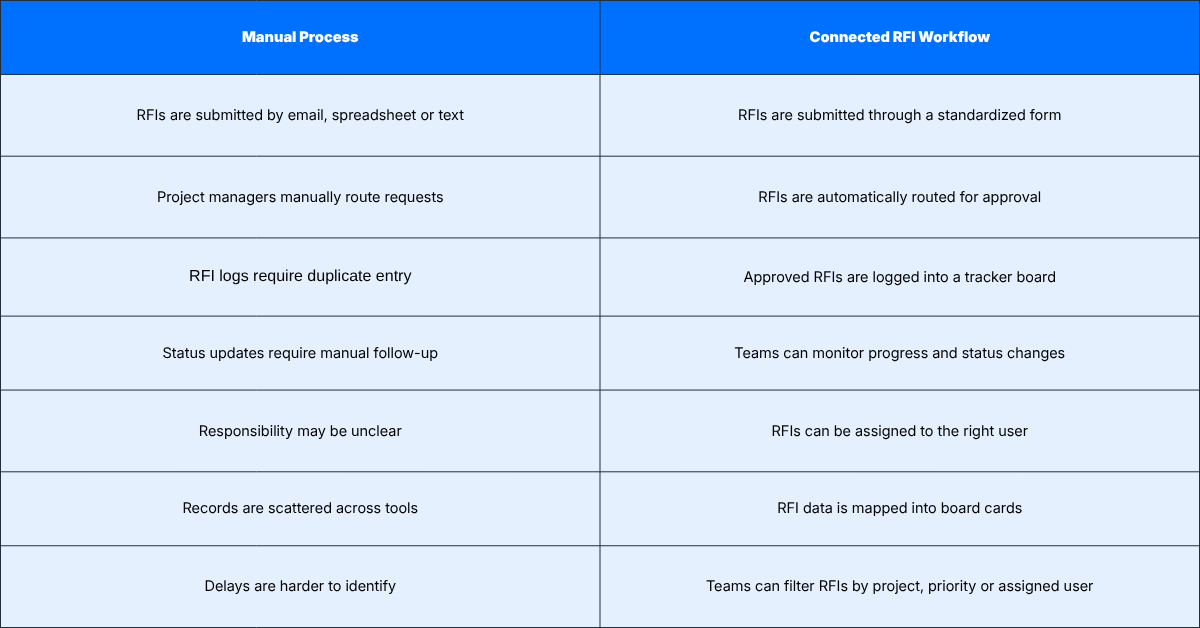
What a Better RFI Workflow Looks Like
A stronger RFI workflow starts by making submission consistent.
Instead of allowing RFIs to come in through scattered channels, teams use a standardized form. That form captures the information needed to understand the request clearly from the beginning. The project, question, priority, due date, responsible party and any supporting files can all be captured in one place.
This matters because the quality of the RFI process depends heavily on the quality of the original submission. If the request is incomplete, vague or missing context, the review process slows down. A standardized form helps reduce that back-and-forth by guiding the submitter to provide the right information upfront.
In Ontraccr, forms are built around three main components - the fields used to capture information, the workflow that controls what happens after submission and the PDF design used when the form is downloaded or sent externally. For an RFI process, that structure is important because the RFI is not just a static document. It is a document that needs to move through a process.
Once submitted, the workflow can route the RFI for review or approval. That review step gives the project team a chance to confirm that the request is complete before it moves further. If something is missing, it can be corrected before it creates confusion with external stakeholders.
From there, the RFI can be tracked in a board-style workflow. Ontraccr boards are designed to track cards across statuses, where each card represents the information being tracked. For RFIs, this means each request can be represented as a trackable item that moves through the stages of the process.
Instead of asking, “Did anyone respond to that email?” The team can look at the RFI tracker and see where the request stands.

The RFI Workflow in Practice
A connected RFI workflow usually follows a few core stages.
First, someone identifies a question that needs clarification. That could come from the field, the office, a subcontractor or another project stakeholder. Rather than sending an informal message, the user completes a structured RFI form.
The form becomes the starting point for the record. It captures the question, the project context, supporting details and any attachments that help explain the issue. Because Ontraccr’s Form Library includes templates for RFIs, teams can start from an existing template and then modify the form fields, workflow or PDF design to match their company’s process.
Then the RFI moves into review. This is where the workflow becomes more valuable than a spreadsheet. Instead of relying on someone to manually forward the request, the workflow can direct the form to the right reviewer or approver. Ontraccr’s form documentation confirms that forms can be approved or rejected from the approval area and approvers can open the form to review more details before approving or rejecting.
Once the RFI is reviewed, it can continue through the next stage of the process. For many teams, that means tracking it on a board so the team can monitor whether it is open, under review, answered, closed or delayed. The board creates a visual layer over the RFI process so project managers do not need to rely only on inboxes or spreadsheets to understand status.
Finally, the completed RFI record remains available for reference. Ontraccr’s documentation identifies the Form Log as the central source of truth for forms, where forms can be tracked and searched. This is valuable because RFIs often become important later, especially if there are disputes, change discussions, schedule impacts or questions about who approved what.
Why This Matters Beyond Documentation
It is easy to think of RFIs as paperwork. But in reality, RFIs are part of project communication, risk management and schedule control.
When RFIs are handled poorly, the impact is rarely limited to the document itself. A late response can hold up work. An unclear answer can lead to rework. A missing record can make it difficult to explain why a decision was made. A scattered process can force project managers to spend too much time chasing information instead of managing the job.
A connected RFI workflow helps reduce those issues by giving the process more structure.
The team knows where RFIs are submitted. Reviewers know where to find requests waiting for approval. Project managers can see which RFIs are still open. The office can search the record when needed. And external-facing documents can be formatted in a way that looks professional, since Ontraccr’s form system includes PDF design as part of the form template.
That does not mean every RFI process needs to be complex. In fact, the best RFI workflows are usually simple enough that the team will actually use them. The goal is to remove friction, not add another layer of administration.
Where Automation Helps Most
The most useful automation in an RFI workflow is usually not flashy. It is the small, repetitive handoffs that save time.
For example, once an RFI is submitted, the workflow can help ensure it reaches the right person instead of waiting for someone to manually forward it. Once it is reviewed, it can move into a tracking system where responsibility and status are clear. If the form needs to be sent or stored as a PDF, the PDF design can help standardize how that document looks when it is shared.
These steps are simple, but they solve a major problem, they reduce the number of places where the process depends on memory.
Manual RFI tracking depends on someone remembering to update the log, follow up with the reviewer, notify the team, save the response and close the record. A workflow gives the process a structure that is easier to repeat.
Who This Workflow Is Best For
An RFI workflow is useful for any construction company that needs better visibility into project questions, but it becomes especially valuable as the number of projects grows.
General contractors can use it to manage incoming RFIs from multiple trades and keep internal review steps consistent. Specialty contractors can use it to formalize clarification requests and maintain a record of responses. Project managers can use it to reduce manual follow-up and see which RFIs still need attention. Operations teams can use it to standardize the process across projects instead of relying on each project manager to maintain their own system.
The workflow is also useful for companies that want to create more consistency without forcing every project to be exactly the same. Ontraccr supports both global and project forms. Global forms can be used across the company, while project forms are intended for workflows that need to be unique to a specific project. That distinction matters because some companies may want a standard RFI process across all projects, while others may need project-specific variations for larger or more complex jobs.
What to Include in an RFI Workflow
A good RFI workflow should be clear enough for the field and detailed enough for the office.
At a minimum, the form should capture the project, the question being asked, the reason clarification is needed, the requested response date and any supporting files or notes. From there, the workflow should define who reviews the RFI, what happens after approval and where the record is tracked.
This is where a tracker board can add a lot of value. Instead of treating the RFI as a completed document the moment it is submitted, the board helps the team manage it as an active item. The RFI can move through statuses as it progresses, giving everyone a clearer picture of what is still waiting for action.
A simple status structure could include:
- Submitted
- Under Review
- Sent for Response
- Answer Received
- Closed
The exact statuses can vary, but the principle is the same, make the process visible.
Bringing It All Together
RFIs are too important to manage casually.
They affect decisions, schedules, communication and project records. When they are tracked manually, the process can become inconsistent and difficult to audit. When they are managed through a connected workflow, the process becomes easier to follow from the first question to the final response.
The value is not just that the RFI becomes digital. The value is that the RFI becomes trackable.
A standardized form helps capture the right information upfront. A workflow helps route the request through the right steps. A board helps project teams monitor status. A searchable form record helps teams find the information later.
That is what turns RFI tracking from administrative follow-up into a repeatable project management process.

Want to see what this looks like in action?
Explore Ontraccr’s Project Management: RFI workflow to see how labor, equipment and material tracking can move from field submission to automated approvals, project updates and reporting.
View the workflow here: https://www.ontraccr.com/workflow/daily-timesheet-lem-report